

Imagine Never Forgetting to Follow Up With a Lead Again
A potential customer visits your website at 11 PM. They fill out a form asking for more information about your service. Normally, that lead might sit in your inbox until the next morning. By then, they may have already contacted three competitors. Now imagine something different. Within seconds of submitting the form, the lead receives a personalized email. A text message follows a few minutes later. Your sales team gets notified instantly. If the lead doesn’t respond, another follow-up goes out automatically two days later. That’s exactly what GoHighLevel workflows are designed to do.
For agencies and small businesses, one of the biggest challenges isn’t getting leads. It’s following up consistently. Studies from lead management firms have shown that businesses that respond to leads within the first few minutes are significantly more likely to convert them compared to those that wait hours or days. This is why more businesses are investing in GoHighLevel automation instead of relying on manual processes.
What Are GoHighLevel Workflows?
In simple terms, GoHighLevel workflows are automated sequences that perform tasks based on customer actions. Think of them as a digital assistant that works 24 hours a day. When something happens, the workflow automatically responds. For example:
- A lead fills out a form.
- A customer books an appointment.
- Someone opens an email.
- A client misses a call.
- A payment is completed.
Instead of handling each task manually, the system takes action automatically. A workflow might:
- Send an email
- Send a text message
- Notify a team member
- Assign a task
- Move a lead in the sales pipeline
- Add a contact tag
The goal is simple: save time while improving customer communication.
Why Businesses Are Using Automation More Than Ever
Let’s be honest. Most business owners don’t wake up excited to send reminder emails or chase leads for follow-ups. Yet those activities directly impact revenue.
According to industry sales research, a large percentage of leads never receive proper follow-up from businesses. In many cases, companies lose potential customers simply because nobody responded fast enough. This is where GoHighLevel automation becomes valuable.
Instead of depending on memory or sticky notes, automation handles repetitive tasks automatically. Real example:
A dental clinic receives appointment requests through its website.
Without automation:
- Staff manually checks inquiries.
- Staff call patients.
- Staff sends reminders.
With automation:
- Confirmation emails are sent instantly.
- Reminder texts are scheduled automatically.
- Missed appointments trigger follow-up messages.
The result? Less administrative work and a better customer experience.
How GoHighLevel Workflows Actually Work
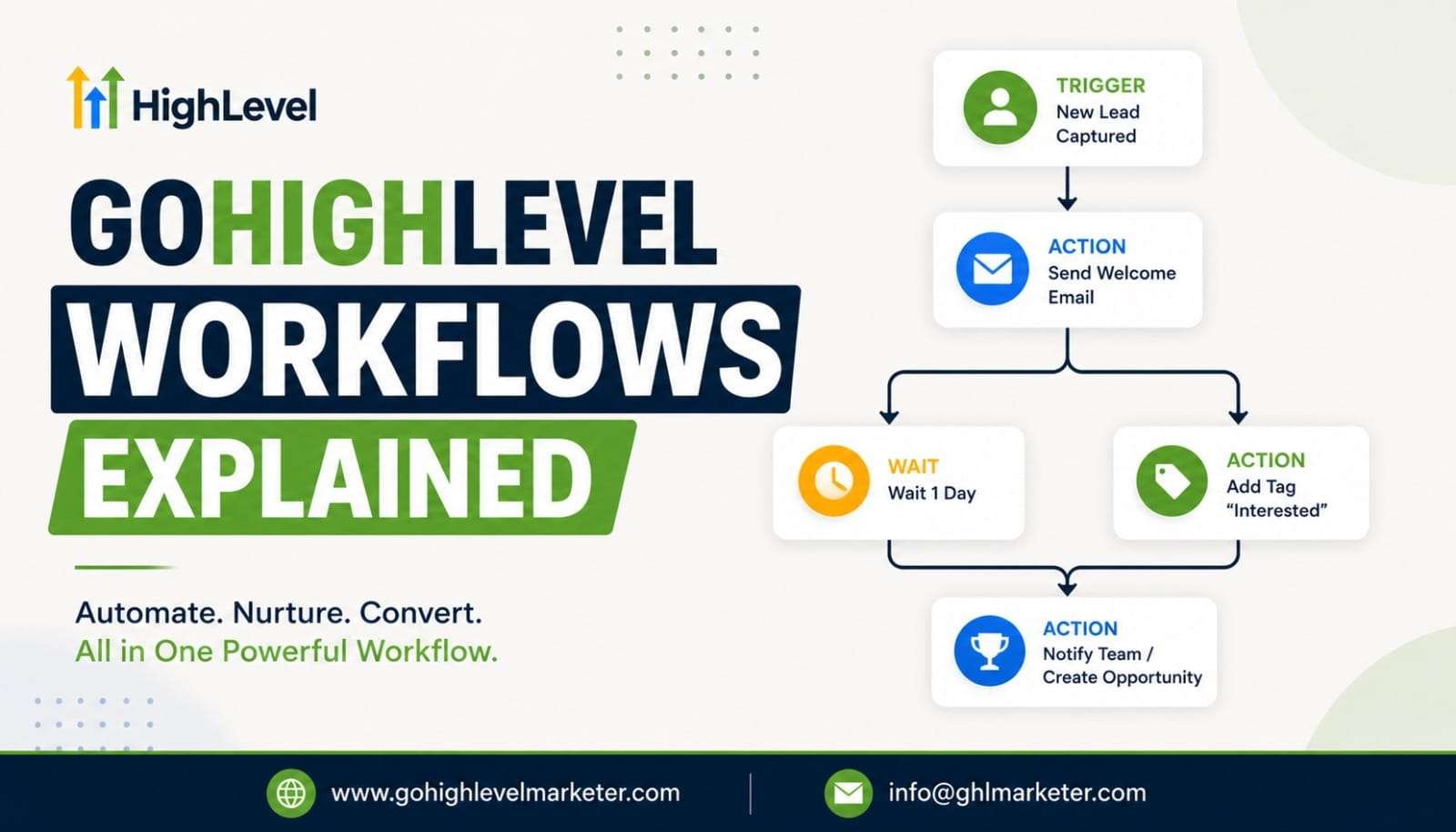
The easiest way to understand GoHighLevel workflows is to break them into three simple parts.
Step 1: Trigger – A trigger starts the automation. Examples include:
- Form submission
- Appointment booking
- New lead creation
- Purchase completed
- Tag added
Think of the trigger as the “start button.”
Step 2: Action – After the trigger occurs, the workflow acts. Examples include:
- Send an email
- Send SMS
- Notify sales staff
- Create a task
- Update contact information
Step 3: Follow-Up Logic – The workflow decides what happens next. For example:
- Wait 24 hours
- Check whether the email was opened
- Send another message
- Move the lead to a different stage
Everything happens automatically.
- No spreadsheets.
- No reminders.
- No manual follow-up.
A Real Estate Example of GoHighLevel Automation
Let’s say you’re a real estate agent running Facebook ads. Someone clicks your ad and requests information about a property. A smart GoHighLevel automation sequence might look like this:
- Minute 0: Lead submits form.
- Minute 1: Welcome email sent.
- Minute 5: Text message sent.
- Hour 1: Sales notification sent to the agent.
- Day 1: Property brochure emailed.
- Day 3: Follow-up text sent.
- Day 7: Invitation to schedule a call.
Instead of manually contacting every lead, the workflow handles most of the process. The agent focuses on conversations rather than administrative tasks.
Why GoHighLevel Email Automation Matters
Email marketing is far from dead. In fact, email continues to deliver one of the highest returns on investment among digital marketing channels.
How Agencies Use GoHighLevel Workflows for Their Clients
Marketing agencies often manage multiple clients at the same time. Without automation, scaling becomes difficult. Imagine managing:
- 10 clients
- 500 monthly leads
- Hundreds of appointments
- Dozens of campaigns
That’s a lot of manual work.
Many agencies use GoHighLevel workflows to automate:
- Lead Follow-Up – New leads receive immediate responses.
- Appointment Reminders – Automated texts reduce no-shows.
- Review Requests – Happy customers receive review requests automatically.
- Client Onboarding – New clients receive welcome emails, forms, and instructions without staff involvement. This allows agencies to serve more clients without dramatically increasing payroll costs.
One of the Most Powerful Features: Multi-Channel Automation
Customers don’t communicate through one channel anymore. Some prefer email. Others prefer text messages. Some respond only after receiving multiple touchpoints. That’s why GoHighLevel automation supports multiple communication channels. A single workflow can include:
- Emails
- SMS messages
- Voicemail drops
- Internal notifications
- Calls
- Pipeline updates
For example:
A roofing company receives a new lead. The workflow can:
- Send an email immediately.
- Send a text message after 10 minutes.
- Notify a salesperson.
- Schedule a reminder task.
- Send another follow-up after 48 hours.
Everything happens automatically.
How GoHighLevel Email Automation Helps Convert More Leads
- Most leads don’t buy after the first interaction.
- People need time.
- They compare options.
- They read reviews.
- They ask questions.
This is where GoHighLevel email automation becomes incredibly useful. Instead of losing contact with potential customers, businesses stay visible through helpful follow-up emails. Examples include:
- Educational content
- Customer success stories
- Frequently asked questions
- Product demonstrations
- Limited-time offers
The goal isn’t to bombard people with sales messages. The goal is to build trust until they’re ready to buy. Businesses that consistently follow up often outperform businesses that stop communicating after the first contact.
Common Workflow Mistakes Businesses Make
Automation is powerful, but it can be misused.
Making Workflows Too Complicated
Many users create giant workflows with dozens of branches on day one.
- Start simple.
- Build one process at a time.
Sending Too Many Messages
- Nobody wants 10 texts and 15 emails in one week.
- Focus on quality communication.
Forgetting to Test
Always test your workflow before going live.
Check:
- Email delivery
- SMS delivery
- Timing delays
- Personalization fields
Ignoring Customer Experience
Automation should feel helpful, not robotic. The best GoHighLevel email automation campaigns sound like they came from a real person. This summer, HighLevel is making AI more accessible than ever. With 50% off your first 3 months, you get powerful tools designed to help you respond faster, book more appointments, and convert more leads without adding extra work to your day.
Plus, eligible users can unlock up to 60 days of FREE AI Agents, including Conversation AI, which engages leads instantly with natural, human-like conversations 24/7. While you’re focused on growing your business, AI helps ensure no opportunity slips through the cracks.
Final Thoughts
At its core, GoHighLevel workflows help businesses do more with less effort. Instead of spending hours sending emails, following up with leads, scheduling reminders, and updating pipelines, businesses can automate these tasks and focus on growth. Whether you’re a marketing agency, real estate professional, coach, consultant, healthcare provider, or local business owner, GoHighLevel automation can reduce manual work while improving customer communication. And when paired with GoHighLevel email automation, businesses can nurture leads, increase engagement, and create consistent customer experiences without adding extra staff.
The reality is simple: businesses don’t lose opportunities because they lack leads. They often lose opportunities because follow-up is slow or inconsistent. Well-built GoHighLevel workflows solve that problem by making sure every lead receives the right message at the right time, automatically.
What are GoHighLevel Workflows?
GoHighLevel Workflows are automation tools that help businesses streamline lead management, customer communication, and follow-up processes. They can automatically trigger actions such as emails, SMS messages, notifications, task assignments, and more based on specific customer behaviors or events.
How do GoHighLevel Workflows help with lead follow-up?
GoHighLevel Workflows automatically engage new leads immediately after they submit a form, book an appointment, or take another action. Automated emails, text messages, and reminders help ensure no lead is overlooked and increase the chances of conversion.
Why is fast lead response important for conversions?
Responding quickly to leads can significantly improve conversion rates. When prospects receive immediate communication after expressing interest, they are more likely to engage with your business before contacting competitors. GoHighLevel automation helps businesses respond within seconds rather than hours.
Can GoHighLevel Workflows send both emails and text messages?
Yes. GoHighLevel Workflows can automate communication across multiple channels, including email, SMS, voicemail drops, and internal notifications. This allows businesses to create personalized follow-up sequences that keep leads engaged.
Who can benefit from using GoHighLevel Automation?
Marketing agencies, consultants, local businesses, coaches, healthcare providers, and service-based companies can all benefit from GoHighLevel automation. Any business that relies on lead generation and customer follow-up can use workflows to save time and improve efficiency.
What happens if a lead does not respond to the first message?
GoHighLevel Workflows can automatically trigger additional follow-up actions based on predefined conditions. For example, if a lead does not reply to an email or text message, the system can send reminders, create tasks for team members, or launch a longer nurturing sequence without any manual intervention.