

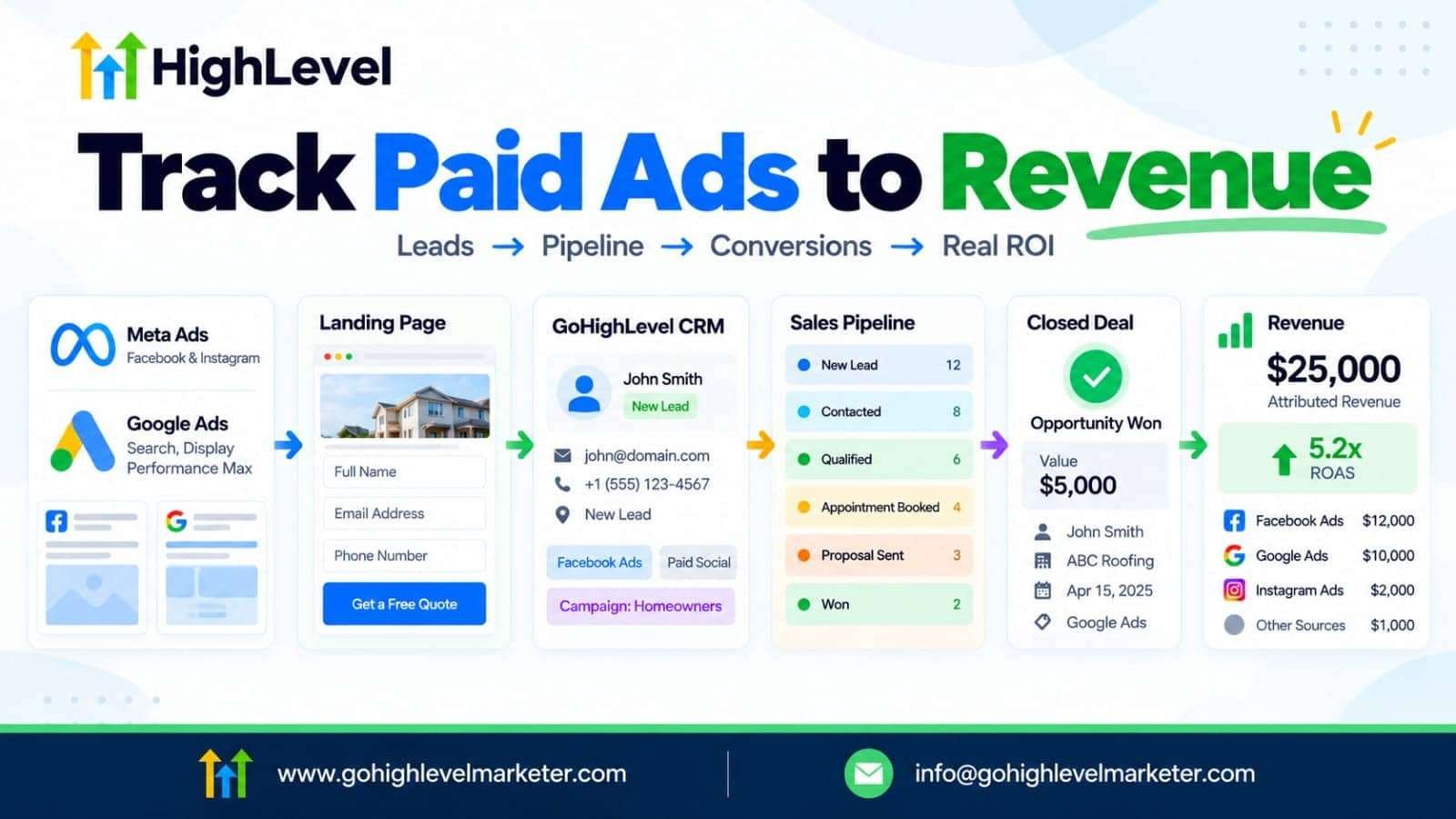
Meta introduction: Running Facebook or Google Ads but struggling to identify which campaigns generate actual customers? Learn how to use GoHighLevel CRM to track paid advertising leads, monitor sales pipeline conversion rates, implement attribution, and measure campaign revenue.
Introduction
Running paid advertising campaigns is relatively easy. Understanding which campaigns generate qualified leads, booked appointments, and paying customers is where things become more challenging.
Many businesses measure advertising performance using impressions, clicks, cost per click (CPC), and cost per lead (CPL). While these metrics are useful, they don’t necessarily tell you whether your advertising investment is generating profitable customers.
For example, imagine running two Facebook advertising campaigns:
- Campaign A generates 100 leads at $5 per lead.
- Campaign B generates 40 leads at $12 per lead.
At first glance, Campaign A appears to be the winner. However, what if only five leads from Campaign A become customers, while 15 leads from Campaign B convert into paying customers?
Campaign B would generate better business results despite producing fewer leads at a higher acquisition cost.
This is where GoHighLevel becomes particularly useful.
By connecting paid advertising platforms with its CRM, sales pipelines, automation workflows, and attribution reporting, businesses can develop a clearer understanding of how marketing activities contribute to actual revenue.
In this guide, we’ll explain how to use GoHighLevel to track paid ads, capture lead sources, monitor pipeline conversion rates, measure revenue attribution, and build a reporting system that helps businesses make better advertising decisions.
1. Why Tracking Paid Advertising Beyond Leads Matters
Before exploring GoHighLevel’s features, it’s important to understand a common problem with traditional advertising reporting.
Advertising platforms primarily measure activities that happen within their own ecosystems.
Meta Ads Manager, for example, reports impressions, clicks, leads, and conversions according to its tracking configuration.
Google Ads provides similar campaign-level reporting.
However, the customer journey doesn’t necessarily end when someone submits a form.
A typical customer journey looks like this:
- A person sees a Facebook or Google advertisement.
- They click the advertisement.
- They visit a landing page.
- They submit an inquiry form.
- A sales representative contacts them.
- They book an appointment.
- They receive a proposal or quotation.
- They become a paying customer.
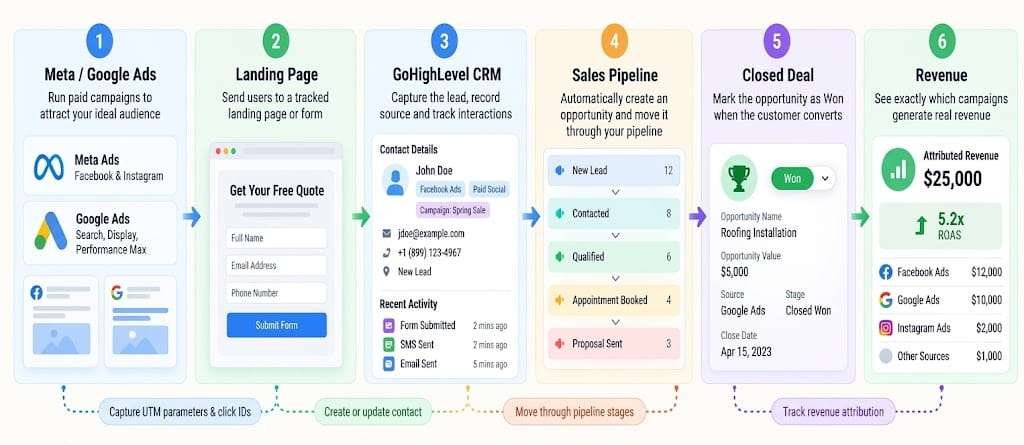
The advertising platform might report a lead conversion at step four, but the business is interested in what happens at steps five through eight.
This creates a gap between advertising performance and sales performance.
A properly configured GoHighLevel CRM helps bridge this gap by connecting marketing attribution with contact records, opportunities, pipeline stages, and conversion events.
Marketing metrics versus business performance metrics
| Marketing metric | What it tells you |
|---|---|
| Impressions | How many times an advertisement was displayed |
| Clicks | How many times people clicked |
| CTR | Percentage of impressions that generated clicks |
| CPC | Average cost per click |
| Leads | Number of inquiries generated |
| CPL | Average advertising cost per lead |
| Qualified leads | Leads meeting your qualification criteria |
| Appointments | Number of booked appointments |
| Cost per appointment | Advertising cost divided by appointments |
| Closed deals | Number of successfully converted opportunities |
| CAC | Cost of acquiring a customer |
| ROAS | Revenue attributed to advertising divided by advertising spend |
The important distinction: A campaign generating inexpensive leads is not necessarily a successful campaign. Your objective should be to identify campaigns that generate qualified prospects and profitable customers.
2. How GoHighLevel Connects Paid Ads with CRM and Sales Pipelines
GoHighLevel combines marketing, CRM, and sales management functionality within one platform.
Instead of treating advertising and sales as separate activities, businesses can connect lead acquisition with subsequent customer interactions.
Its main components include:
- Lead capture: Capture prospects through landing pages, forms, surveys, calendars, and supported advertising integrations.
- Contact management: Store prospect information, communication history, tags, custom fields, and attribution details.
- Opportunity management: Create opportunities and move them through customized sales pipeline stages.
- Workflow automation: Trigger actions when leads enter the CRM, book appointments, change pipeline stages, or meet specified conditions.
- Attribution reporting: Analyze contact sources and marketing interactions to understand which channels contribute to leads and sales.
- Conversion tracking: Send supported conversion events back to advertising platforms to improve measurement and campaign optimization.
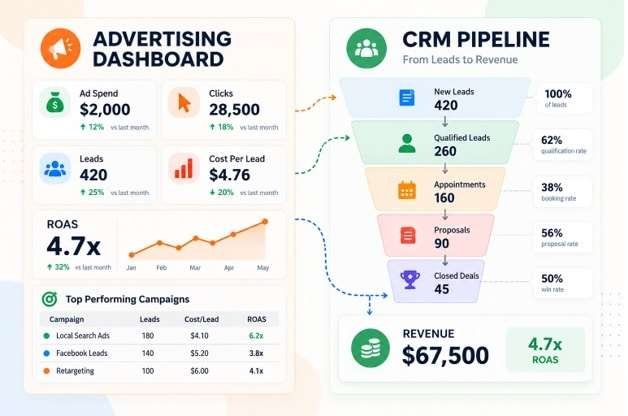
3. How to Set Up Paid Ads Lead Tracking in GoHighLevel
Accurate tracking begins before your first advertisement goes live.
You need to configure your landing pages, tracking parameters, integrations, and contact capture process correctly.
Step 1: Connect your advertising accounts
Start by connecting the relevant advertising platforms to your GoHighLevel sub-account.
Depending on your setup, you may connect:
- Facebook and Instagram advertising accounts.
- Google Ads accounts.
- Relevant Facebook pages.
- Supported lead form integrations.
Navigate to the appropriate integration settings within your sub-account.
Verify that the correct advertising account is connected and that the necessary permissions have been granted.
This helps establish the connection between your advertising campaigns and GoHighLevel reporting.
Step 2: Install tracking pixels and configure conversion tracking
For Meta advertising, configure the Meta Pixel and, where appropriate, the Conversions API (CAPI).
The pixel helps measure website activity, while CAPI allows supported conversion events to be sent from server-side or CRM-based workflows.
For Google Ads, configure the relevant conversion tracking and ensure that advertising click identifiers are captured.
Important identifiers include:
- GCLID: Google Click Identifier.
- GBRAID: Google identifier used in certain privacy-related attribution scenarios.
- WBRAID: Another Google advertising identifier used in applicable privacy-related scenarios.
- FBCLID: Facebook Click Identifier.
These identifiers help connect subsequent CRM activities with the original advertising interaction.
Important: Installing a pixel alone does not establish complete CRM attribution. You must also configure the relevant events, integrations, and data flow.
Step 3: Configure UTM parameters
UTM parameters help identify the source, medium, campaign, and other details associated with website traffic.
For example, a Facebook advertising landing-page URL could look like this:
https://example.com/landing-page/
?utm_source=fb_ad
&utm_medium=paid_social
&utm_campaign=roofing_leads
&utm_content=video_creative_01
A Google Ads URL could use:
https://example.com/landing-page/
?utm_source=adwords
&utm_medium=paid_search
&utm_campaign=roofing_search
&utm_content=adgroup_01
You can also use dynamic parameters to capture campaign and ad identifiers.
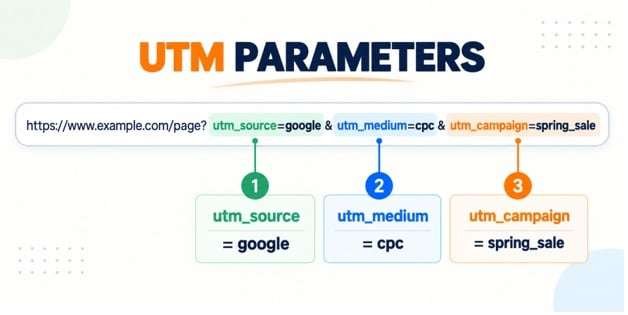
Here is a recommended UTM naming convention:
| Parameter | Purpose | Example |
|---|---|---|
| utm_source | Advertising platform | fb_ad |
| utm_medium | Marketing channel | paid_social |
| utm_campaign | Campaign name | roofing_leads |
| utm_content | Ad or creative | video_creative_01 |
| utm_term | Keyword or targeting term | emergency_roofing |
HighLevel’s attribution documentation specifies that UTM values are case-sensitive and that utm_source=facebook has been deprecated for its paid-social classification in favor of utm_source=fb_ad.
Maintain consistent naming conventions across campaigns to prevent reporting inconsistencies.
Step 4: Connect landing pages and lead capture forms
Create your landing page using GoHighLevel’s funnel or website builder.
Add a form that collects the information needed by your sales team.
For example:
- Full name.
- Email address.
- Phone number.
- Service required.
- Project budget.
Map these fields to the relevant CRM contact fields.
Configure the form submission process so that the contact record is created or updated correctly.
For more accurate attribution, ensure that the visitor completes a supported tracked action while the relevant tracking information is available.
If you’re using external websites, investigate HighLevel’s External Tracking functionality and verify that your forms and attribution capture are configured correctly.
Step 5: Test your tracking before launching campaigns
Do not assume that tracking works simply because the pixel is installed.
Perform a test submission using a URL containing your UTM parameters.
Then check whether:
- The contact appears in GoHighLevel.
- The correct source is recorded.
- Campaign information is captured.
- Relevant click identifiers are retained.
- The contact enters the correct workflow.
- An opportunity is created where required.
Testing before spending advertising money can prevent significant reporting problems later.
4. How to Track Lead Sources and Campaign Attribution in GoHighLevel
Once leads begin entering your CRM, you need to understand where they originated.
GoHighLevel provides attribution information that can help identify the marketing channels responsible for generating contacts.
Its attribution system distinguishes between two important concepts.
First-touch attribution
First-touch attribution records the first tracked interaction associated with a contact.
For example:
A prospect discovers your business through a Facebook advertisement, visits your landing page, and submits a form.
Facebook becomes the recorded first-touch source.
This is useful when evaluating which channels introduce new prospects to your business.
Latest-touch attribution
Latest-touch attribution records the most recent tracked interaction.
Imagine the same prospect later returns through a Google Ads campaign and submits another tracked form.
The latest attribution may now reflect Google Ads.
This helps identify the most recent tracked marketing interaction.
| Attribution type | Main purpose | Example |
|---|---|---|
| First touch | Understand initial discovery | Facebook Ads |
| Latest touch | Understand the most recent tracked interaction | Google Ads |
Neither model tells the complete customer journey by itself.
A prospect might discover your business through Facebook, return through organic search, receive an email, and finally book an appointment after a sales call.
For this reason, comparing first-touch and latest-touch attribution is more useful than relying on only one measurement.
Where to find attribution information
Within GoHighLevel, attribution information can be reviewed through contact records and the Attribution Report.
The report helps you analyze lead sources, opportunities, and attributed revenue.
Depending on your tracking configuration, available data can include:
- Paid search.
- Paid social.
- Organic search.
- Social media.
- Direct traffic.
- Referral traffic.
- Third-party sources.
- CRM-created contacts.
You should also examine attribution information at the opportunity level.
This is particularly important because a contact’s source and an opportunity’s source are not necessarily the same reporting field.
5. How to Build a Sales Pipeline for Paid Advertising Leads?
Tracking leads is only the beginning.
To measure campaign quality, you need to understand what happens after a prospect enters your CRM.
GoHighLevel allows users to create customized opportunity pipelines that reflect their sales processes.
For example, a marketing agency might use the following stages:
| Pipeline stage | Meaning |
|---|---|
| New Lead | A new inquiry has entered the CRM |
| Contacted | Sales representative has contacted the prospect |
| Qualified | Prospect meets the qualification criteria |
| Appointment Booked | Consultation has been scheduled |
| Proposal Sent | Commercial proposal has been delivered |
| Negotiation | Prospect is considering the offer |
| Won | Customer has purchased |
| Lost | Opportunity did not convert |
The pipeline should reflect actual business operations rather than arbitrary stages.
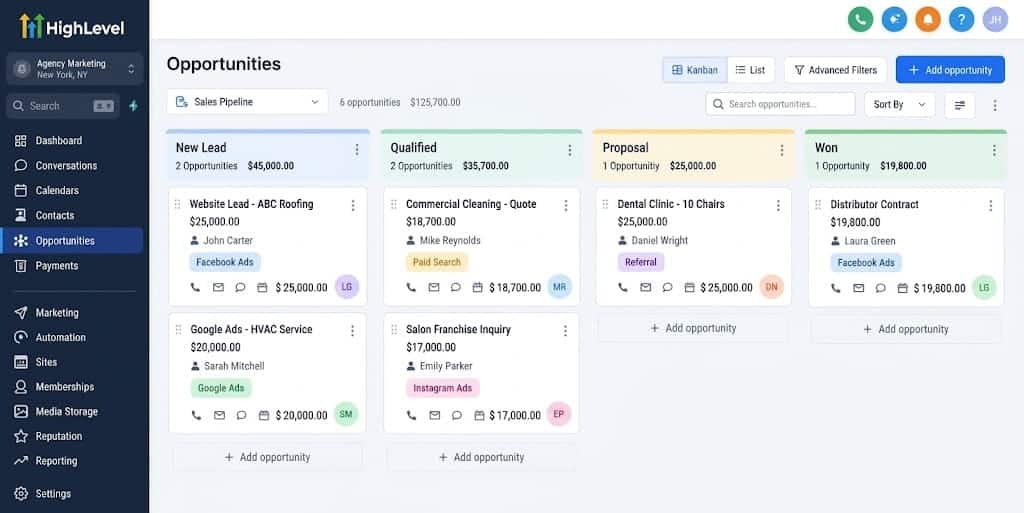
How to automate pipeline movement
You can use GoHighLevel workflows to automate relevant actions.
For example:
Trigger: Customer submits a lead form.
Actions:
- Create or update contact.
- Apply an advertising source tag.
- Assign the contact to a salesperson.
- Create an opportunity.
- Add the opportunity to the New Lead stage.
- Send an acknowledgement email or SMS.
- Notify the assigned representative.
When the prospect books an appointment, another workflow can update the opportunity stage and trigger appointment reminders.
When a salesperson marks the opportunity as Won, a separate workflow can record the conversion event and initiate post-sale communication.
Why pipeline stages matter for advertising optimization
Consider two advertising campaigns:
| Metric | Campaign A | Campaign B |
|---|---|---|
| Leads | 100 | 50 |
| Qualified leads | 20 | 30 |
| Appointments | 10 | 20 |
| Closed customers | 2 | 8 |
| Ad spend | $500 | $600 |
Campaign A generates more leads, but Campaign B generates four times as many customers.
Without pipeline tracking, you might mistakenly increase spending on Campaign A.
This is why connecting advertising sources with opportunity stages is essential.
6. How to Calculate Pipeline Conversion Rates in GoHighLevel
Pipeline conversion rates help you identify where prospects are dropping out of your sales process.
Rather than measuring only the overall lead-to-customer conversion rate, evaluate the conversion between individual pipeline stages.
Important conversion rate formulas
Lead-to-qualified conversion rate
[\frac{\text{Qualified Leads}}{\text{Total Leads}}\times100]Lead-to-appointment conversion rate
[\frac{\text{Booked Appointments}}{\text{Total Leads}}\times100]Appointment show-up rate
[\frac{\text{Appointments Attended}}{\text{Appointments Booked}}\times100]Proposal-to-customer conversion rate
[\frac{\text{Won Deals}}{\text{Proposals Sent}}\times100]Lead-to-customer conversion rate
[\frac{\text{Won Customers}}{\text{Total Leads}}\times100]Practical conversion rate example
Imagine a business receives 200 advertising leads in one month.
| Sales stage | Number of prospects | Stage conversion |
|---|---|---|
| New leads | 200 | 100% |
| Contacted | 160 | 80% |
| Qualified | 100 | 62.5% |
| Appointments booked | 60 | 60% |
| Proposals sent | 35 | 58.3% |
| Won customers | 15 | 42.9% |
The overall lead-to-customer conversion rate is:
[\frac{15}{200}\times100=7.5%]This tells us that 7.5% of all incoming leads became customers.
However, the stage-level metrics reveal additional information.
For example, only 80% of leads were contacted. This could indicate a follow-up problem.
Similarly, if a large percentage of booked appointments fail to attend, the business may need better reminders and appointment confirmation workflows.
A useful reporting practice: Measure stage conversion using consistent cohorts. For example, compare leads created in a particular month with their subsequent outcomes rather than mixing new leads with older opportunities. This avoids misleading conversion rates when sales cycles are long.
How to monitor conversion performance
GoHighLevel provides opportunity and pipeline reporting, including conversion-related metrics.
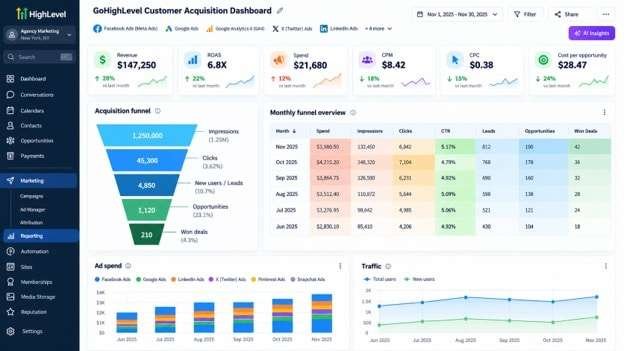
Its dashboards and reporting tools can help businesses evaluate pipeline value, stage distribution, and opportunity outcomes.
You can also use custom dashboards and reports to compare marketing sources and pipeline performance.
7. How to Attribute Closed Deals and Revenue to Paid Advertising?
This is where marketing reporting becomes significantly more valuable.
Instead of measuring only how many leads an advertisement generates, you want to understand how much revenue those leads eventually produce.
GoHighLevel’s Attribution Report helps connect marketing sources with opportunities and closed revenue.
For example:
| Metric | Facebook Ads | Google Ads |
|---|---|---|
| Ad spend | $1,000 | $1,500 |
| Leads | 100 | 75 |
| Qualified leads | 30 | 40 |
| Appointments | 20 | 30 |
| Won customers | 5 | 10 |
| Revenue | $5,000 | $12,000 |
Let’s calculate the return on advertising spend.
Facebook Ads ROAS
[\frac{5000}{1000}=5]Google Ads ROAS
[\frac{12000}{1500}=8]Google Ads generates an attributed revenue return of 8x compared with Facebook’s 5x.
However, this is not necessarily the same as profitability.
You must also consider delivery costs, salaries, agency fees, refunds, overhead, and other expenses.
Revenue attribution versus ROI
These metrics are often confused.
- Attributed revenue: Revenue credited to a marketing source under a particular attribution method.
- ROAS: Attributed advertising revenue divided by advertising spend.
- ROI: Net return relative to the investment, taking relevant costs into account.
- Customer acquisition cost: Total acquisition costs divided by new customers acquired.
For example, a campaign can generate $10,000 in attributed revenue from $2,000 in advertising spend, producing a 5x ROAS.
But if the business spends another $5,000 delivering the service and paying acquisition-related expenses, the actual profit picture is very different.
Important: GoHighLevel attribution data should not automatically be interpreted as a complete profitability report. You need reliable advertising cost data and business cost information to calculate profitability.
8. A Marketing Automation Practitioner’s Perspective: What Makes GoHighLevel Different?
One of the most valuable parts of an integrated advertising and CRM system is the ability to send downstream conversion events back to advertising platforms.
This allows advertising systems to receive information about what happens after a lead enters your CRM.
For example, instead of optimizing campaigns only for form submissions, a business may want to provide signals when leads become qualified or convert into paying customers.
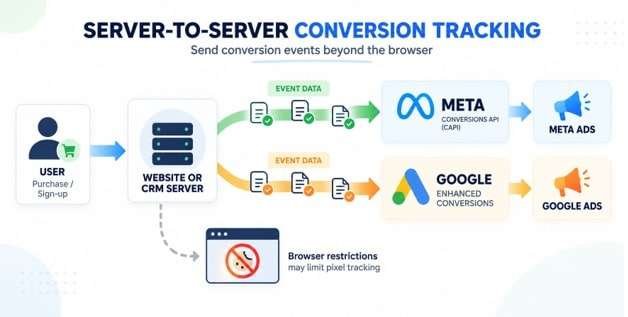
Meta Conversions API with GoHighLevel
GoHighLevel supports workflows that can send supported conversion events to Meta through the Conversions API.
A simplified workflow looks like this:
- A prospect clicks a Facebook advertisement.
- The prospect submits a lead form.
- GoHighLevel creates the contact record.
- The lead enters the sales pipeline.
- A salesperson qualifies the prospect.
- A pipeline-stage change triggers a workflow.
- The workflow sends a supported event to Meta.
- Meta uses the matched event data for measurement and applicable campaign optimization.
The Facebook Click ID (FBCLID), lead identifiers, and other matching information can be important for accurate event matching.
GoHighLevel also documents a Conversion Leads integration for Meta Lead Ads, which can help advertisers optimize toward lead quality rather than simply lead volume.
However, this integration has eligibility and volume considerations, so check the current requirements before implementation.
Google Ads offline conversion tracking
GoHighLevel supports Google Ads offline conversion workflows.
This is particularly useful when a lead clicks an advertisement but converts into a customer later through a phone call, consultation, or sales interaction.
The process works as follows:
- A user clicks a Google advertisement.
- Google passes an identifier such as GCLID, GBRAID, or WBRAID.
- The identifier is captured and stored with the contact.
- The prospect enters the sales pipeline.
- A salesperson updates the opportunity.
- A workflow triggers when the lead reaches a qualifying stage.
- GoHighLevel sends the conversion event to Google Ads.
- Google can associate the event with the original advertising interaction when matching information is available.
HighLevel’s Ad Manager also supports creating and managing Google Ads offline conversion actions.
One important distinction: creating a conversion action does not automatically send conversion events. You must configure the relevant workflow action or another supported import method.
The current Ad Manager conversion-action flow is specifically for offline conversions. It does not replace separate website conversion tracking.
Which conversion events should you send?
Consider the following event structure:
| Funnel stage | Possible conversion event |
|---|---|
| Lead captured | Lead |
| Lead qualified | Qualified lead |
| Appointment booked | Schedule |
| Proposal accepted | Purchase or appropriate configured event |
| Deal won | Purchase or appropriate configured event |
The event name and configuration should match the destination platform’s supported event definitions and your actual business activity.
Avoid sending duplicate events for the same action. Maintain clear event definitions and test your integrations.
9. Building a GoHighLevel Paid Ads Reporting Dashboard
A good dashboard should answer five questions:
- How much are we spending?
- How many leads are we generating?
- How many leads are becoming qualified opportunities?
- How many opportunities are converting into customers?
- How much revenue is attributed to each advertising source?
You can use GoHighLevel’s reporting and custom dashboard functionality to bring these metrics together.
Recommended dashboard structure
| Dashboard section | Metrics to include |
|---|---|
| Advertising performance | Spend, impressions, clicks, CTR, CPC |
| Lead generation | Total leads, CPL, source breakdown |
| Lead quality | Qualified leads, qualification rate |
| Sales performance | Appointments, show-up rate, won deals |
| Pipeline performance | Open opportunities, stage conversion, pipeline value |
| Revenue performance | Closed revenue, ROAS, CAC |
For agencies, consider building separate dashboards for each client or advertising account.
You can also create recurring reports for clients and internal marketing teams, depending on the available reporting features and permissions.
Recommended reporting frequency
- Daily: Check campaign delivery, spend, and tracking failures.
- Weekly: Review lead quality, follow-up performance, and pipeline movement.
- Monthly: Evaluate closed deals, customer acquisition costs, revenue attribution, and budget allocation.
Avoid making major budget decisions based on a single day’s performance, particularly when the business has a longer sales cycle.
10. Common Paid Ads Tracking Mistakes in GoHighLevel
Even with a comprehensive CRM, poor configuration can produce inaccurate reporting.
Here are common problems to avoid.
1. Inconsistent UTM parameters
Using different naming conventions for the same advertising platform can fragment reporting.
For example:
- fb
- fb_ad
Use consistent naming conventions and follow HighLevel’s supported attribution classifications.
2. Not capturing ad click identifiers
If important click identifiers are lost before the contact record is created, downstream conversion matching can fail.
Test your landing pages and forms to ensure the relevant identifiers are captured and retained.
3. Creating opportunities without source information
A contact may have attribution data while its associated opportunity has an empty source field.
This can cause opportunities to appear under N/A in lead source reporting.
Ensure that your opportunity creation process maps source information correctly.
4. Optimizing only for lead volume
A campaign generating hundreds of low-quality leads can consume more resources than a campaign generating fewer qualified prospects.
Track lead qualification, appointments, and closed deals.
5. Ignoring sales follow-up speed
Advertising performance depends partly on what happens after a lead submits a form.
If sales representatives take several hours to respond, qualified prospects may contact competitors.
Use automation to acknowledge inquiries, assign leads, and notify sales representatives.
6. Failing to update pipeline stages
Your attribution and conversion reports are only as useful as the CRM information behind them.
If salespeople do not update opportunities when leads are qualified, lost, or won, the reporting system becomes unreliable.
7. Confusing attribution with causation
A contact being attributed to a campaign does not prove that the campaign alone caused the sale.
First-touch and latest-touch models provide useful perspectives, but they do not represent every interaction in the customer journey.
Use them alongside sales data and other measurement methods.
8. Double-counting conversions
If the same event is sent through multiple integrations or tracking systems without proper deduplication, advertising platforms may report inflated conversion numbers.
Establish clear event ownership and test your conversion integrations.
11. Practical Example: Tracking a Local Business Advertising Campaign
Let’s put everything together using a hypothetical roofing company.
The company spends $2,000 monthly on Meta and Google Ads.
It wants to identify which platform generates the most profitable customers.
Advertising results
| Metric | Meta Ads | Google Ads |
|---|---|---|
| Ad spend | $800 | $1,200 |
| Leads | 80 | 60 |
| Qualified leads | 20 | 30 |
| Appointments | 12 | 24 |
| Won customers | 3 | 8 |
| Average sale | $2,000 | $2,500 |
| Revenue | $6,000 | $20,000 |
Performance analysis
Meta Ads:
- CPL: $10.
- Cost per customer: $266.67.
- ROAS: 7.5x.
Google Ads:
- CPL: $20.
- Cost per customer: $150.
- ROAS: 16.67x.
Meta generates cheaper leads, but Google Ads generates more customers per dollar spent and higher attributed revenue.
This information can guide the next advertising budget allocation.
However, the business should also examine profit margins, sales capacity, lead quality, and campaign maturity before reallocating the entire budget.
How GoHighLevel supports this process
The company can use GoHighLevel to:
- Capture advertising leads.
- Record campaign attribution.
- Assign prospects to sales representatives.
- Create opportunities.
- Automate appointment reminders.
- Track pipeline progression.
- Record won and lost deals.
- Review lead sources and attributed revenue.
- Send supported conversion events back to advertising platforms.
This creates a more connected measurement process than evaluating advertising campaigns using CPL alone.
12. Best Practices for Accurate GoHighLevel Advertising Attribution
If you want reliable reporting, follow these recommendations:
- Establish a consistent UTM naming convention.
- Capture relevant advertising click identifiers.
- Test every lead capture form.
- Maintain standardized pipeline stages.
- Require sales representatives to update opportunity statuses.
- Record opportunity values accurately.
- Configure Meta CAPI and Google offline conversions where appropriate.
- Avoid duplicate conversion events.
- Compare first-touch and latest-touch attribution.
- Review source-level conversion rates regularly.
- Reconcile advertising spend with CRM revenue.
- Document tracking changes and test after updates.
A useful additional practice is to maintain a tracking audit sheet documenting each campaign, landing page, UTM structure, conversion event, CRM workflow, and destination advertising account.
This makes troubleshooting easier, particularly when several campaigns and client accounts are involved.
Final Verdict
GoHighLevel can provide much more meaningful advertising insights when its CRM, attribution, sales pipelines, and conversion integrations are configured together.
Instead of measuring success through impressions and lead volume alone, businesses can build a reporting process that connects advertising activity with qualified opportunities and closed revenue.
The most important step is to establish reliable tracking before launching campaigns, maintain accurate CRM records, and regularly review how leads progress through the sales pipeline.
The objective isn’t simply to generate more leads. It’s to understand which advertising investments produce the best customers and sustainable business growth.
Can GoHighLevel track which Facebook ad generated a lead?
Yes. GoHighLevel supports Facebook and Instagram advertising attribution through supported tracking configurations. Using UTMs, Meta Pixel, and relevant conversion integrations helps identify the campaign and advertising source associated with incoming leads.
Can GoHighLevel track Google Ads leads?
Yes. GoHighLevel can capture Google Ads attribution information, including relevant UTMs and click identifiers such as GCLID, GBRAID, and WBRAID. These identifiers can also support offline conversion tracking when configured correctly.
Does GoHighLevel show lead sources?
Yes. GoHighLevel provides attribution and lead source reporting that can help businesses understand where contacts and opportunities originate.
What is the difference between first-touch and latest-touch attribution in GoHighLevel?
First-touch attribution identifies the initial tracked interaction associated with a contact. Latest-touch attribution identifies the most recent tracked interaction. Comparing both provides a better understanding of the customer journey.
Can GoHighLevel track sales conversion rates?
Yes. GoHighLevel provides opportunity and pipeline reporting that can help businesses evaluate how opportunities move through sales stages. You can use these figures to calculate lead-to-customer and stage-to-stage conversion rates.
Can GoHighLevel calculate advertising ROAS?
GoHighLevel provides advertising and attribution reporting capabilities, but calculating reliable ROAS requires accurate advertising spend and attributed revenue data for the same reporting scope and period. Validate your cost and revenue data before using the result for budget decisions.
Can GoHighLevel send CRM conversions back to Facebook?
Yes. GoHighLevel supports Meta Conversions API workflows that can send supported conversion events to Meta. Proper event configuration and matching information are essential.
Can GoHighLevel send offline conversions to Google Ads?
Yes. GoHighLevel supports Google Ads offline conversion actions and workflow-based conversion event submission. You must configure the conversion action, retain the relevant click identifiers, and send the actual conversion event.
Why are some GoHighLevel leads showing as direct traffic or N/A?
This can happen when tracking parameters are missing, attribution is not captured during a supported interaction, contacts are created manually, or opportunity source fields are not populated. Review your UTM configuration, contact attribution, and opportunity creation workflows.
What is the best way to measure paid advertising performance in GoHighLevel?
Use a combination of advertising metrics, CRM attribution, lead qualification, pipeline conversion rates, closed revenue, customer acquisition costs, and ROAS. Avoid relying exclusively on clicks and cost per lead.